 Select Saved Estimates to search
both Invoices and Saved Estimates according to your search criteria.
Select Saved Estimates to search
both Invoices and Saved Estimates according to your search criteria.Navigate to Parts & Service.
Go to customer look-up screen and search for the customer by name or other search criteria.
Select Invoice from customer record.
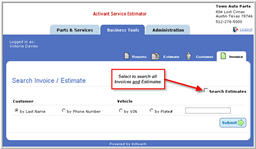
Select Saved Estimates to search
both Invoices and Saved Estimates according to your search criteria.
Click image to see a larger view.