 Any change to the Estimate will require you to record
the customer authorization again.
Any change to the Estimate will require you to record
the customer authorization again.Recall Estimate unless it is already open and scroll to the bottom of the Estimate.
Select Method of Authorization.
Insert comments is applicable.
Click on Authorize.
Any change to the Estimate will require you to record
the customer authorization again.
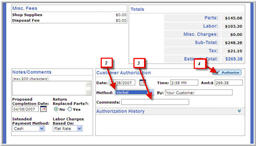
Click image to see a larger view.