 Your profile determines the pricing and other important
information on your Estimates and Invoices. It
is critical that you set up the values in this section before you start
to use the application to generate your Estimates and Invoices.
Your profile determines the pricing and other important
information on your Estimates and Invoices. It
is critical that you set up the values in this section before you start
to use the application to generate your Estimates and Invoices.Your profile or shop options is where you enter all the specific information for inclusion on Estimates and Invoices customized to your business.
Your profile determines the pricing and other important
information on your Estimates and Invoices. It
is critical that you set up the values in this section before you start
to use the application to generate your Estimates and Invoices.
You can set a new password for accessing Service Estimator at any time.
The address information that is in Service Estimator is displayed on printed estimates and invoices.
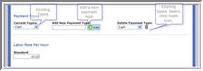
Your Service Estimator is automatically set up to receive payments from default sources.
To view payment types set up in your Service Estimator
View drop down list under Current Payment Types.
Input the name of the payment type in the center box.
Click Add Payment Type button.
Select payment from the third window drop down list.
Click trash icon.
Click image to see a larger view
Enter your default hourly labor rate. The
labor rate along with the labor time will be used to calculate the total
cost to your customer for a particular labor operation.  As you create an Estimate you may insert alternative labor
rates for specific labor jobs.
As you create an Estimate you may insert alternative labor
rates for specific labor jobs.
Margin based pricing determines the “Sell” price for parts or other goods viewed in the electronic catalog or that are added to your estimates. You can choose from three different pricing models:
Select list price option.
Select Profit % option.
Select Cost Price from drop down on far right.
Insert the % amount you wish to add to your cost price of parts.
1. Select
Profit % option.
2. Select
List Price from drop down on far right.
3. Insert
the amount you wish to discount from List price.
This determines the tax rate that you charge your customers for different
categories of fees.
Select the country that your Estimates and Invoices are subject to.
Activant Service Estimator supports multiple tax rates for parts, labor, shop supplies and disposal fees. There are also two custom fields for additional tax rate inclusion.
Activant Service Estimator supports multiple tax rates, including GST, HST, PST and QST for parts, labor, shop supplies and disposal fees. There are also two custom fields for additional tax rate inclusion.
PST taxation can also be set so that taxes are charged on the Estimate or Invoice’s pre-GST amount or to charge PST on the amount including the GST.
Under Calculate Taxes By (Select one):, select Pre-Tax amount or PST on GST option.
The Activant Service Estimator supports the addition of up to two other fees on your estimates.
Enter the description and charge for the item. These will appear as options when you edit your Estimates.
Service Estimator has default text in place for use in the disclaimer section or you can insert the text that is relevant or required by your business.
To use default disclaimers:
Insert number of days estimate will be valid for in first text box in ______ space.
Insert warranty information in second text box in _____ spaces.
Activant does not guarantee that the supplied default
text is sufficient for use in all States and territories. Please
consult the appropriate resource to ensure the disclaimers you use are
appropriate.
To use your own disclaimers:
Copy (Control+C) your disclaimer text from its location on your computer.
Select all (Control+A) in the Disclaimer Window.
Paste (Control+V) disclaimer text into the window.
Activant Service Estimator allows you to add your own logo image to
your Estimates and Invoices.
You must upload a .jpg or .gif format image that is 150x70 pixels in size.If your image is a different size, it may appear distorted.
You cannot change the distributor logo or the distributor address that appears at the top of the Service Estimator application.
Service Estimator allows you to add or retain state and federal notices for inclusion on Estimates and Invoices. You can select to show these notices on the Estimate or Invoice or both. You can use the default messages or add your own according to the requirements in your State.
This shows how many user licenses you have available.
If you require additional user licenses, please contact your Supplier or
Service Estimator Administrator.
Select this option if you wish to show the cost price of parts on the parts search results page.
The cost price will only be visible on the Search Results
pages. Cost
pricing will not appear on any customer documents.
Service Estimator Jobs feature extended descriptions for of the work being performed. Check this box if you wish to display these extended descriptions on your estimates and invoices. If you choose to display the descriptions, they can be edited by clicking the Edit Parts & Labor Items from the Estimate.
To save all information click Submit now.
You will receive both an on-screen and email confirmation of your update.